Basic steps
Create native UI and register this into ReactPackage
1. Create a view
- rn_view_example.xml
<?xml version="1.0" encoding="utf-8"?>
<LinearLayout
    xmlns:android="http://schemas.android.com/apk/res/android"
  android:layout_width="match_parent"
  android:layout_height="match_parent">
  <TextView
      android:layout_width="300dp"
      android:layout_height="100dp"
      android:text="Test"/>
</LinearLayout>
class RNViewExample: LinearLayout {
    var myContext: ThemedReactContext = context as ThemedReactContext;

    constructor(context: ThemedReactContext): super(context) {
        init();
    }
    private fun init() {
        inflate(context, R.layout.rn_view_example, this)
    }
}
2. Create a view manager to use this view in React Native
class RNViewManagerExample : SimpleViewManager<RNViewExample>() {
    override fun getName() = "RNViewExample"

    override fun createViewInstance(reactContext: ThemedReactContext): RNViewExample {
        return RNViewExample(reactContext)
    }
}
3. Register View Manager into ReactPackage
class RNAircastPackage : ReactPackage {
    override fun createNativeModules(reactContext: ReactApplicationContext): List<NativeModule> {
        return emptyList()
    }

    override fun createViewManagers(reactContext: ReactApplicationContext): List<ViewManager<*, *>> {
        return mutableListOf(
            RNViewManagerExample()
        )
    }
}
Create a view component in JS/TS
1. Create a view component
import React from 'react';
import { requireNativeComponent, ViewProps } from 'react-native';

export const NativeViewExampleRaw = requireNativeComponent<{}>(
  'RNViewExample'
);

type Props = ViewProps;

const NativeViewExample: React.FC<Props> = (props) => {
  return <NativeViewExampleRaw {...props} />;
};

export default NativeViewExample;
2. Load this React component
...
  <NativeViewExample style={styles.player} />
...

const styles = StyleSheet.create({
  player: {
    width: '100%',
    height: '50%',
    backgroundColor: '#ddd',
    marginTop: 15,
  },
});
Reference bridging-native-ui-components
How to expose a prop in view manager?
1. Expose a prop name url in native code
// ViewManager

class RNViewManagerExample : SimpleViewManager<RNViewExample>() {
    ...
    @ReactProp(name = "url")
    fun setUrl(view: RNViewExample, url: String) {
      view.url = url
    }
}
// ExampleView

class RNViewExample: LinearLayout {
  ...

  var url: String? = null
  set(value) {
    field = value
  }
  ...
}
2. Pass this prop in JS
const NativeViewExample: React.FC<Props> = () => {
  ...
  return <NativeViewExampleRaw
    style={style}
    url={url}
  />;
};

export default NativeViewExample;
How to expose methods in native view?
Expose these 2 methods
class RNViewExample: LinearLayout {
  ...
  fun play() {
    player.play()
  }

  fun stop() {
    player.stop()
  }
};
1. Create a command map in view manager
class RNViewManagerExample : SimpleViewManager<RNViewExample>() {
  ...
  override fun getCommandsMap(): Map<String, Int> {
    return ViewProps.Commands.toCommandsMap()
  }

  override fun receiveCommand(
    root: RNViewExample,
    commandId: String?,
    args: ReadableArray?
  ) {
    super.receiveCommand(root, commandId, args)
    // you can also get argument like this: args!!.getString(0)
    when (commandId) {
      ViewProps.Commands.PLAY.ordinal.toString() -> root.play()
      ViewProps.Commands.STOP.ordinal.toString() -> root.stop()
    }
  }
  ...
}
// ViewProps

import com.facebook.react.common.MapBuilder

class ViewProps {

  enum class Commands(val action: String) {
    PLAY("play"),
    STOP("stop");

    companion object {
      fun toCommandsMap(): Map<String, Int> {
        return values().associate { it.action to it.ordinal }
      }
    }
  }
}
2. Expose these methods in JS view component
type NativeProps = {
  style: ViewStyle;
  url: string;
};

export type NativeMethods = {
  play: () => void;
  stop: () => void;
};

///////////////////////////////////
///////////////////////////////////

export const NativeViewManager =
  requireNativeComponent<NativeProps>('RNViewExample');

const JSViewExample = forwardRef<NativeMethods, NativeProps>(
  ({ style, url }, ref) => {
    const nativeRef = useRef<typeof NativeViewManager | null>(null);

    useImperativeHandle(ref, () => ({
      play: () => {
        UIManager.dispatchViewManagerCommand(
          findNodeHandle(nativeRef.current),
          UIManager.getViewManagerConfig(
            'RNViewExample'
          ).Commands.play.toString(),
          [] // you can pass argument to method as well
        );
      },
      stop: () => {
        UIManager.dispatchViewManagerCommand(
          findNodeHandle(nativeRef.current),
          UIManager.getViewManagerConfig(
            'RNViewExample'
          ).Commands.stop.toString(),
          []
        );
      },
    }));

    return (
      <NativeViewManager
        style={style}
        url={url}
        ref={nativeRef as any}
      />
    );
  }
);

export default JSViewExample;
3. Render this JS View component and trigger native method
const MyComponent = () => {
  const playerRef = useRef<any>(null);
  const [play, setPlay] = useState(false);


  const playStop = () => {
    if (play) {
      playerRef.current.play();  // call native method
    } else {
      playerRef.current.stop();  // call native method
    }

    setPlay(!play);
  };

  return (
    <>
      <Button onPress={playStop}>{!play ? 'STOP' : 'PLAY'}</Button>
      <JSViewExample
        style={styles.player}
        url={'srt://xxxxxxxxxxx'}
        ref={playerRef}
      />
    </>
  );
};

const styles = StyleSheet.create({
  player: {
    width: '100%',
    height: '10%',
    backgroundColor: '#ddd',
    marginTop: 15,
  },
});

export default MyComponent;
Reference
pass-onpictureinpicturemodechanged-result-into-a-react-native-module
how-to-implement-a-react-native-ui-component-method-in-android
How to send event from native to JS?
Method 1
Native side
- View
class RNViewExample(reactContext: ReactApplicationContext): LinearLayout {
  private val reactContext = reactContext

  fun play() {
    ...

    val event = Arguments.createMap()
    event.putString("data", "my name")

    reactContext.getJSModule(
      RCTEventEmitter::class.java
    ).receiveEvent(
      id,
      "play", // event name
      event
    )
  }
};
- ViewManager
class RNViewManagerExample : SimpleViewManager<RNViewExample>() {
  ...
  override fun getExportedCustomDirectEventTypeConstants(): MutableMap<String, Any> {
    return MapBuilder.of(
      "play",  // event name
      MapBuilder.of("registrationName", "onPlay")) // onPlay is the prop name
  }
}
JS Side
export const NativeViewManager =
  requireNativeComponent<NativeProps>('RNViewExample');

const JSViewExample = forwardRef<NativeMethods, NativeProps>(
  ({ style, url }, ref) => {

    ...

    return (
      <NativeViewManager
        ...
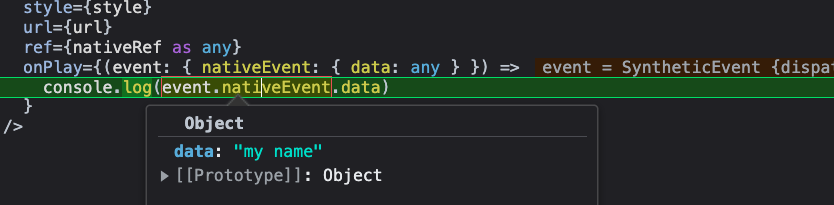
        onPlay={(event: { nativeEvent: { data: any } }) =>
          console.log(event.nativeEvent.data)
        }
      />
    );
  }
);

export default JSViewExample;
Q&A
- How to pass reactContext into View?
Pass “reactContext” into ViewManager at ReactPackage file
class RNAircastPackage : ReactPackage {
    ...

    override fun createViewManagers(reactContext: ReactApplicationContext): List<ViewManager<*, *>> {
        return listOf(
          RNViewManagerExample(reactContext)
        ).toMutableList()
    }
}
Method 2
Native side
            val params = Arguments.createMap()
            params.putString("data", "Your data is here...")

            reactContext
                .getJSModule(RCTDeviceEventEmitter::class.java)
                .emit("onEventEmit", params)
JS Side
import { DeviceEventEmitter } from 'react-native';

...

  useEffect(() => {
    const onEventEmit = (event) => {
      console.log(event);
    };
    DeviceEventEmitter.addListener('onEventEmit', onEventEmit);
  }, []);
How to override Activity life cycle in this native UI
Extend the view with LifecycleEventListener
class RNViewExample(reactContext: ReactApplicationContext): LinearLayout, LifecycleEventListener {

    // ...

    override fun onHostResume() {

    }

    override fun onHostPause() {

    }

    override fun onHostDestroy() {
        stopPlaying()
    }
}
Leave a Reply