How to view the detail of a package?
npm view react-native
How to check why a package exists in the project?
yarn why react-native-safe-area-context
How to set a registry for npm/ yarn?
Create .npmrc and .yarnrc
# .npmrc
registry=https://xxxxxxxx/npm/yyyy
# .yarnrc
registry https://xxxxxxxx/npm/yyyy
What is yarn-lock.json/ npm-lock.json file?
These are autogenerated lock files that have the entries of the exact versions of the dependencies used in the project
This file locks the dependencies to their stipulated versions during the installation process, after establishing the versioning parameters in the package.json file
How to use yarn to install dependencies from the npm’s package-lock.json?
Run the yarn import command in a repository having the package-lock.json file
Yarn will apply the resolution parameters in the package-lock.json file to generate a corresponding yarn.lock file
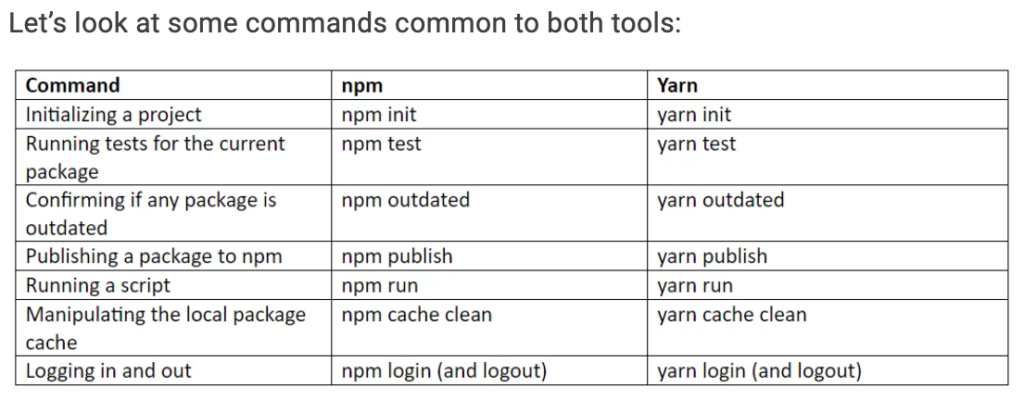
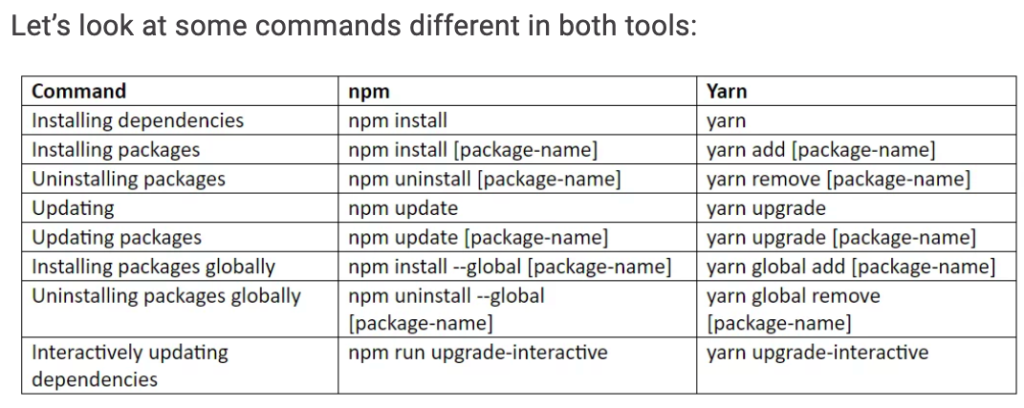
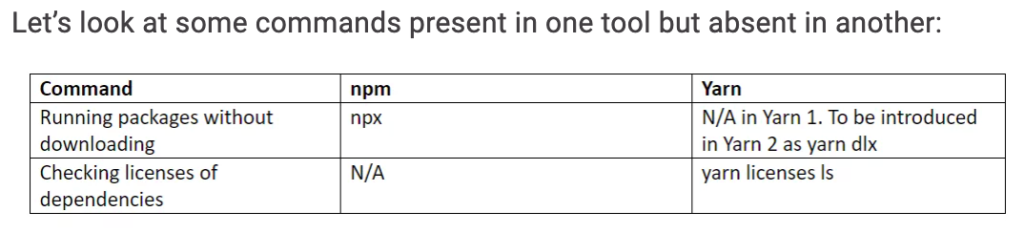
What is the difference between yarn and npm regarding CLI commands?
Why can’t my npm dependency pull dist folder after being installed?
This may be because you don’t have .npmignore file, then .gitignore is used instead, and dist folder is set in .gitignore
How to install/ uninstall node version?
- Install nvm
nvm#installing-and-updating
curl -o- https://raw.githubusercontent.com/nvm-sh/nvm/v0.39.1/install.sh | bash - Install a node version
nvm install [version] - Uninstall a node version
nvm uninstall [version] - Install the latest node version
nvm install node
How to switch node version
nvm alias default [version]
Leave a Reply